How to simulate the Franzininho WiFi on Wokwi
Wokwi is an online electronics simulator. You can use it to simulate Arduino, ESP32, and many other popular boards, components, and sensors. It was built for makers, by makers.
The Franzininho WiFi is based on Espressif's ESP32-S2 chip, and Wokwi offers full support for it. You can use the simulator to learn how to program it, prototype your ideas, and share your projects with other makers — without needing physical hardware.
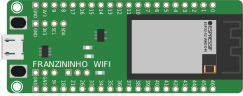
Click the image above to open a new Franzininho WiFi project on Wokwi.
Configuring the Compilation Platform
A Wokwi project consists of two elements:
diagram.json— describes the circuit (board, components, and connections)- Code files — determine the platform used (Arduino, CircuitPython, or ESP-IDF)
The diagram.json is the starting point of any project. For the Franzininho WiFi, it must contain the board-franzininho-wifi component:
{
  "version": 1,
  "author": "Your Name",
  "editor": "wokwi",
  "parts": [
    {
      "type": "board-franzininho-wifi",
      "id": "franzininho",
      "top": 0,
      "left": 0,
      "attrs": {}
    }
  ],
  "connections": [],
  "dependencies": {}
}
The platform is identified by Wokwi based on the code file added to the project:
| Platform | Main file |
|---|---|
| Arduino | sketch.ino |
| CircuitPython | code.py |
| ESP-IDF | main.c |
To add a file to your project in Wokwi, click the + icon in the files tab of the editor and enter the file name according to the table above.
Arduino
The Arduino framework is the most accessible option for beginners. Code is written in C++ using Arduino abstractions (setup() and loop()).
Add a file named sketch.ino with the minimal content:
void setup() {
  Serial.begin(115200);
}

void loop() {
  Serial.println("Hello, Franzininho WiFi!");
  delay(1000);
}
All libraries compatible with ESP32/ESP32-S2 in the Arduino IDE are also available in the simulator.
CircuitPython
CircuitPython is a Python implementation maintained by Adafruit, designed for rapid prototyping. Code is interpreted directly — there is no compilation step.
Add a file named code.py with the minimal content:
import time

while True:
    print("Hello, Franzininho WiFi!")
    time.sleep(1)
In CircuitPython, the file must be named code.py. Other names will not be recognized as an entry point.
ESP-IDF
ESP-IDF (Espressif IoT Development Framework) is Espressif's native framework for ESP32 chips. It provides full access to the hardware and is recommended for projects that require greater control, performance, or direct use of FreeRTOS.
Add a file named main.c with the minimal content:
#include <stdio.h>
#include "freertos/FreeRTOS.h"
#include "freertos/task.h"

void app_main(void) {
    while (1) {
        printf("Hello, Franzininho WiFi!\n");
        vTaskDelay(pdMS_TO_TICKS(1000));
    }
}
If you are just getting started, use Arduino. If you already have experience with ESP32 and need advanced features such as FreeRTOS, native drivers, or memory optimization, ESP-IDF is the right choice.
Learn More
Franzininho WiFi documentation on Wokwi
For more information about other simulator features, take a look at the list below. You can also consult the Wokwi documentation for complete references on components and diagrams.
- diagram.json format
- Editor Keyboard Shortcuts
- The Serial Monitor
- Using GDB on Wokwi
- Logic Analyzer Guide
- Working with Libraries
- ESP32 Simulator
- ESP32 WiFi
Simulator Examples
Arduino
- LCD Clock with NTP client
- Servo motor control
- RGB LED mixer (using 3 potentiometers)
- TFT ILI9341 display
- MQTT
- NTP