Musical Instrument with Buzzer
In this example we will create a program that reads a score and plays the music through a buzzer on the Franzininho DIY. We will learn how to use a passive buzzer to generate each musical note with the help of timer0.
Have fun!
Required Resources
- Franzininho DIY (with Micronucleus)
- 1 passive buzzer 5V
- 4 male-female jumpers
- 1 male-male jumper
Making Music with the Buzzer
In this example, using a lookup table we will encode the frequencies of each note, and using the timer we will vary the input of the buzzer at the frequency of the note we want. With another table, we will give the Franzininho the sequence of notes we want it to play, allowing us to play any music we want.
The passive buzzer works like a small speaker: while we have the nominal voltage at the positive input and ground at the negative input, the magnet inside moves forward. On the other hand, when we have ground at both, it returns to its initial position. If we vary between these two states at the frequency of a musical note, we generate a sound wave with that pitch.
Western musical notes in a major scale are Do Do# Re Re# Mi Fa Fa# Sol Sol# La La# Si, returning to Do afterwards. Each note is a semitone away from the next, and 6 tones away from the next octave, which is the same note but higher.
Looking at frequencies, starting from La of the third octave at 440Hz, each La one octave higher has double the frequency and each octave lower has half the frequency. To go up each semitone, simply multiply by 2^(1/12), or for x semitones, 2^(x/12).
Code
/***********************************************
 * @file main.c
 * @author Eduardo Dueñas / Daniel Quadros
 * @brief Example of playing music using a buzzer
 * @version 1.0
 * @date 21/04/2021
 *
 * last modified: 15/05/2021
 **********************************************/
#include <avr/io.h>
#include <avr/interrupt.h>

#define F_CPU 16500000L

#define setBit(value,bit)      (value |= (1 << bit))
#define clearBit(value,bit)    (value &= ~(1 << bit))
#define toggleBit(value,bit)   (value ^= (1 << bit))
#define testBit(value,bit)     (value & (1 << bit))


#define NumNotes 32
#define CONT(freq) ((F_CPU*10L)/(256L*freq))

enum notes {Pause, Do, DoS, Re, ReS, Mi, Fa, FaS, Sol, SolS, La, LaS, Si, DoM, DoSM, ReM};
long f[16] = {
    255L, (long)CONT(5232L), (long)CONT(5543L), (long)CONT(5873L), (long)CONT(6222L), (long)CONT(6592L), (long)CONT(6984L),
    (long)CONT(7400L), (long)CONT(7840L), (long)CONT(8306L), (long)CONT(8800L), (long)CONT(9323L), (long)CONT(9877L),
    (long)CONT(10465L), (long)CONT(11087L), (long)CONT(11746L)
};

// {0xFF,123, 116, 110, 104, 98, 92, 87, 82, 78, 73, 69, 65, 62, 58, 54}
// Lookup table with the values of each note to be placed in the timer flag

char Score[NumNotes] = {
    Re, Mi, Mi, Re, Sol, FaS, FaS, FaS, Re, Mi, Mi, Re, La, Sol, Sol, Sol,
    Re, ReM, ReM, Si, Sol, FaS, FaS, Mi, DoM, Si, Si, Sol, La, Sol, Sol, Sol
};                                       // Score of the music
volatile char pos = 0;                   // Position in the score
volatile long aux = 0;

// Interrupt handler
ISR (TIM0_COMPB_vect) {                  // Compare B vector
  if (aux <= 0xff) {                     // If aux less than 8 bits
    OCR0B = (TCNT0 + aux) & (0xff);      // Send aux to counter
    aux = f[Score[pos]];                 // Reset aux
    toggleBit(PORTB, PB1);              // Toggle buzzer
  }
  else {                                 // Otherwise
    OCR0B = TCNT0;                       // Send current time to counter (same as waiting for overflow)
    aux -= 0xff;                         // Subtract 8 bits from aux
  }
}

// Main function
int main() {
  enum notes note;
  setBit(DDRB, PB1);                     // Configure PortB1 as output, buzzer pin

  // Timer configuration
  TCCR0A = 0x00;                         // Configure compare pin disconnected
  TCCR0B = 0x04;                         // Configure prescaler as 256
  setBit(TIMSK, OCIE0B);                 // Enable interrupt on COMPB compare
  sei();                                 // Enable global interrupts
  aux = f[Score[pos]];                   // Start COMPB counter

  if (aux <= 0xff) {
    OCR0B = (TCNT0 + aux) & (0xff);
    aux = f[Score[pos]];
    toggleBit(PORTB, PB1);
  }
  else {
    OCR0B = TCNT0;
    aux -= 0xff;
  }

  // Infinite loop
  for (;;) {
    long i;
    for (i = 0; i < 1000000L; i++) {
      asm ("nop");
      pos++;                             // Advance in the score
      if (pos >= NumNotes) pos = 0;      // Play again
  }
}
Assembly
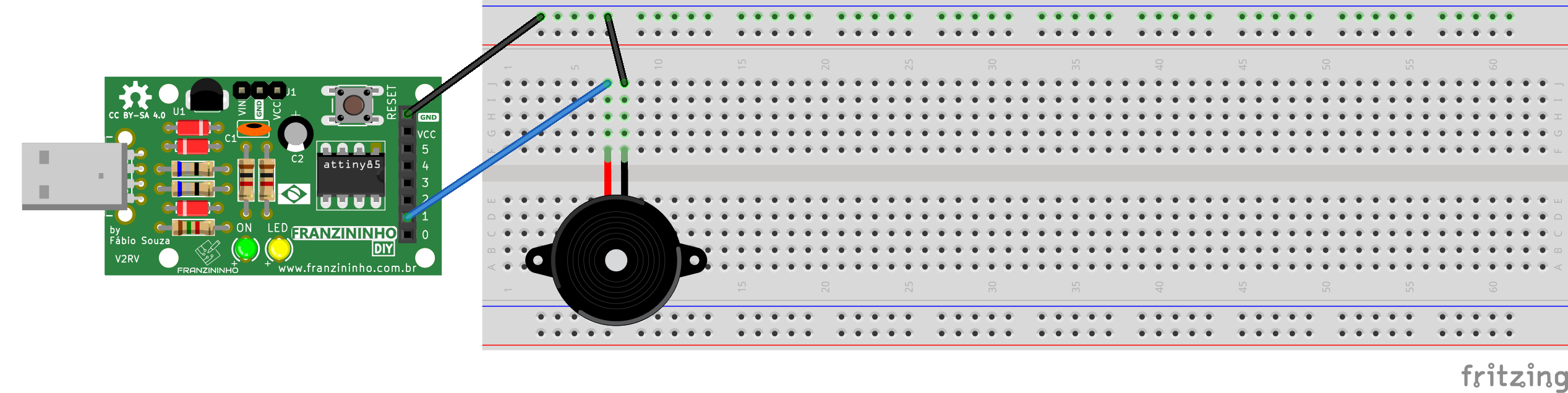
Depending on the buzzer, it may be necessary to connect the jumpers directly to the buzzer pins rather than placing it on the breadboard.
Compilation and Upload
To compile the program, navigate to the example folder and run the make command:
exemplos-avr-libc/exemplos/buzzer$ make
Since we already have the makefile configured in the folder, compilation will be done and the following message should appear:
../../micronucleus/2.0a4/launcher  -cdigispark --timeout 60 -Uflash:w:main.hex:i
Running Digispark Uploader...
Plug in device now... (will timeout in 60 seconds)
> Please plug in the device (will time out in 60 seconds) ...
Connect the board to a USB port, or if the Franzininho is already connected, press the reset button to start the upload.
Result
The buzzer should play Happy Birthday and continue in a loop until the board is powered off.
Simulate this example on Wokwi
Conclusion
The passive buzzer is a very versatile component with which we can not only play music but also generate various types of sound effects. All we need is to understand how to generate the sound we want. We also saw how to use timer interrupts for functions that require Real Time, i.e., that need timing precision.
Glossary
- Set: place a new value in a register. For a bit, setting it conventionally means changing it to value 1, and clear (clear) means changing it to value 0.
- Reset: restart
- Timer: electronic circuit dedicated to time counting
- Lookup table: reference table; in a programming context it is a vector with information needed by the program.
| Author | Eduardo Dueñas |
|---|---|
| Date: | 05/06/2020 |