Getting Started
This material aims to show the first steps for programming microcontrollers using C language with a hardware-oriented approach. A series of examples (with detailed explanations about the ATtiny85 architecture) will be presented for programming the Franzininho DIY using AVR Libc.
It is important to have the Franzininho DIY pinout to make the connections as described in the examples.
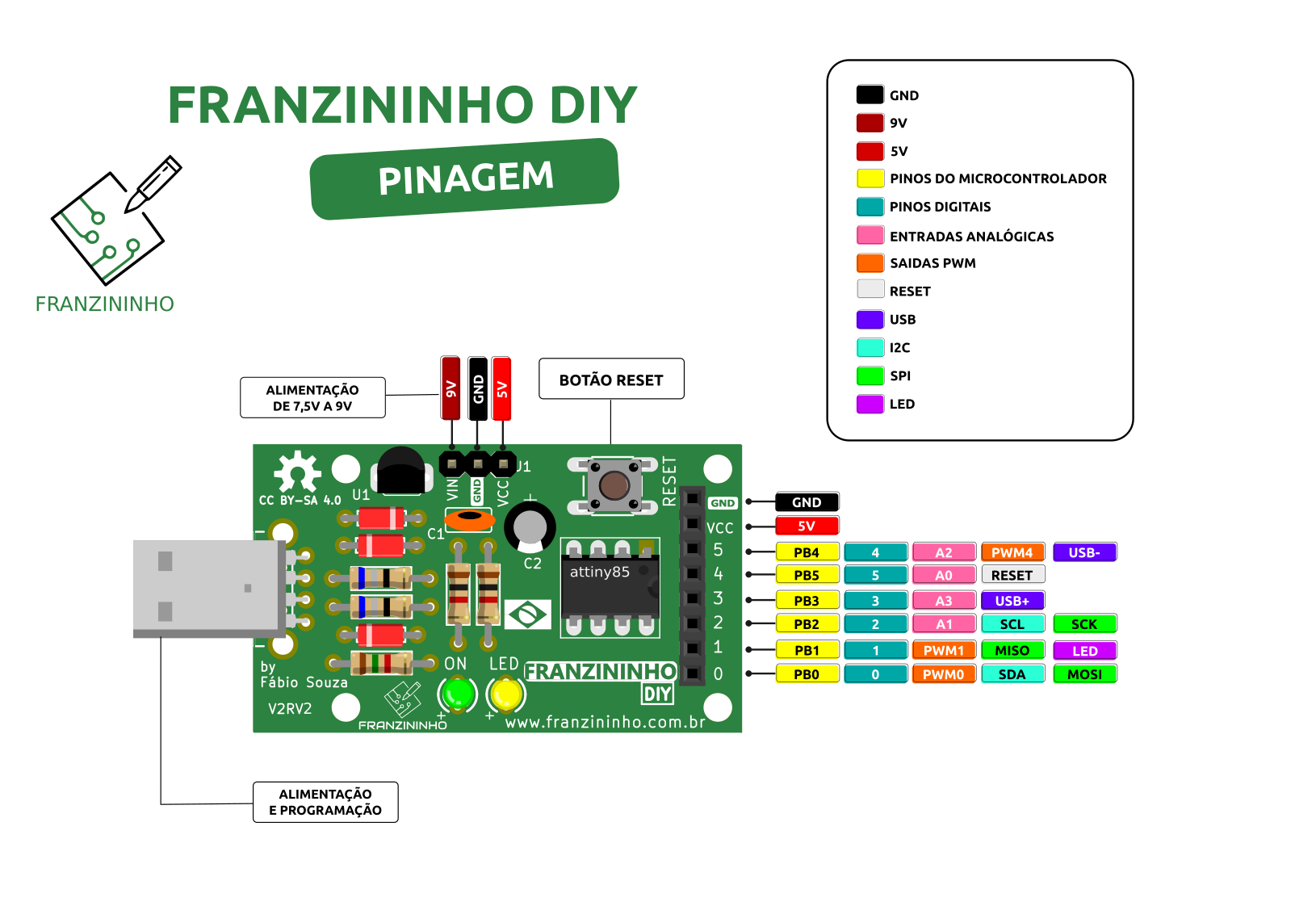
Required Tools
You will not need a specific compiler or IDE to compile the examples presented. However, it is important to have the following tools installed on your machine:
- GCC AVR
- avr libc
- binutils-avr
- make
Installing Required Tools (Linux):
sudo apt install gcc-avr
sudo apt install avr-libc
sudo apt install binutils-avr
sudo apt install make
The Franzininho board must have the Micronucleus bootloader (the official bootloader for the Franzininho DIY).
Linux Compilation
cd ../exemplos-avr-libc/exemplos/01-hello
make all
Arduino IDE
You can also reproduce all the examples presented directly in the Arduino IDE (without using the Arduino framework). This will make the tool installation and configuration process easier, as well as the upload.
 Wokwi
Wokwi
You can also use the Wokwi Online Simulator to reproduce the projects presented in this series.
PICSimLab
If you don't have internet access or a good connection, another available option to reproduce the examples on your machine is the PICSimLab simulator, which supports the Franzininho DIY.
Repositories and Support Materials
All examples will be hosted on the Franzininho project github. It is important that you use the ATtiny85 datasheet as support material, as well as the AVR Libc documentation.
Enjoy this journey.
Learn More
Franzininho – An Arduino for everyone
| Author | Fábio Souza |
|---|---|
| Date: | 24/04/2021 |