External Interrupt
External interrupts allow the microcontroller to interrupt its regular task execution to perform a higher-priority task when an external event occurs. This can be useful in applications that require a fast response to external events, such as pressing a button or receiving a signal from another device.
Configuring an external interrupt on the ATTINY85 involves defining the pin that will be used as the interrupt source, configuring the logic level that will trigger the interrupt, and defining the interrupt service routine that will execute when the interrupt fires.
When programming the Franzininho DIY (ATTINY85) with the avrlibc library, you can easily configure external interrupts using library functions like sei() and cli(). In addition, avrlibc offers many other useful libraries for the ATTINY85, making the programming process easier and more efficient.
Required Resources
- Franzininho DIY board (with Micronucleus)
- Tactile switch
- Jumper wires
- Computer with software tools installed
Circuit
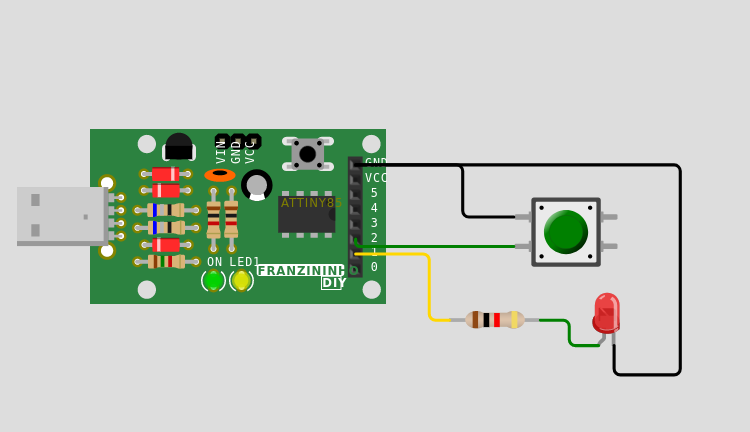
Code
/**
 *
 * @file main.c
 * @author Fábio Souza
 * @brief Example for button reading and LED activation
 * @version 0.1
 * @date 2021-02-03
 *
 * @copyright Franzininho
 * This example code is in the Public Domain (or CC0 licensed, at your option.)
 * Unless required by applicable law or agreed to in writing, this
 * software is distributed on an "AS IS" BASIS, WITHOUT WARRANTIES OR
 * CONDITIONS OF ANY KIND, either express or implied.
 *
 */

#include <avr/io.h>
#include <avr/interrupt.h>

#define F_CPU 16500000L

// Auxiliary macros for bit manipulation
#define setBit(value,bit) (value |= (1<<bit))
#define clearBit(value,bit) (value &= ~(1<<bit))
#define toggleBit(value,bit) (value ^= (1<<bit))
#define testBit(value,bit) (value & (1<<bit))

// define the pin the button is connected to
#define BUTTON_PIN PB2
// define the pin the LED is connected to
#define LED_PIN PB1


ISR (INT0_vect)        // Interrupt service routine
{
  toggleBit(PORTB, LED_PIN);
}

int main()
{
  setBit(DDRB, LED_PIN);       // Configure pin PB1 as output (LED pin)
  clearBit(DDRB, BUTTON_PIN);  // Configure pin PB0 as input (button pin)
  setBit(PORTB, BUTTON_PIN);   // Enable pull-up for input PB0 - ensures
                               // logic level 1 when button is not pressed

  setBit(GIMSK, INT0);         // Enable external interrupt INT0
  setBit(MCUCR, ISC01);        // Configure falling edge
  sei();                       // Enable global interrupts

  while(1)
  {

  }

  return 0;
}
Simulation
Challenge
Make the LED turn on when the button is pressed and turn off when released. To do this, you will need to configure the interrupt on the rising edge.
| Author | Fábio Souza |
|---|---|
| Date: | 05/02/2023 |