Button Reading
In this example we will read a button and activate an LED when it is pressed.
Materials
- Franzininho board
- Breadboard
- 3mm LED
- 1 330 Ohm resistor
- 1 1k resistor
- 1 Button
- Male/female jumper wires
Circuit
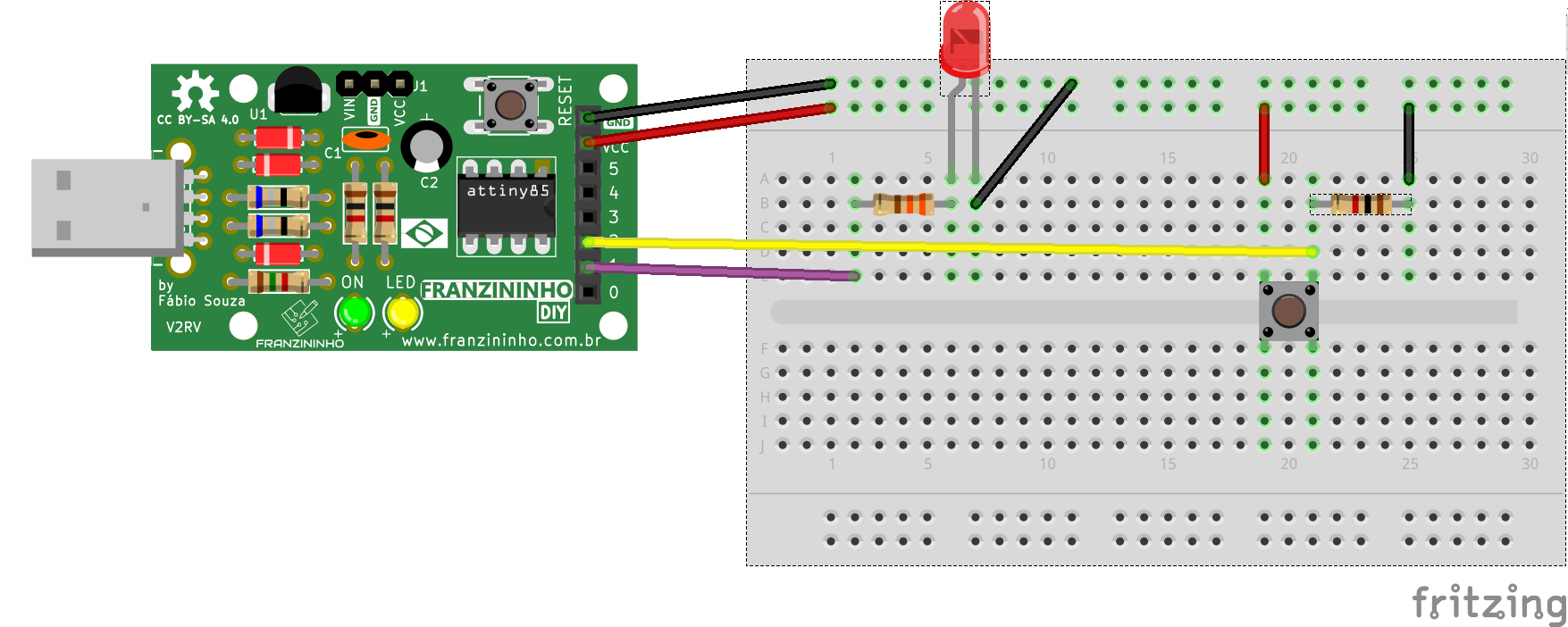
On the breadboard insert the LED, resistors, and button as shown in the image below:
Sketch
/*
  Franzininho
  Example: Button Reading - Pull Down
  This example shows how to read a button with a pull-down resistor
  and activate an LED when it is pressed
*/
const int LED = 1;    // pin for the LED
const int BUTTON = 2; // pin for the button
int val = 0; // val will be used to store the pin state

void setup(){
  pinMode(LED, OUTPUT);    // the LED is an output
  pinMode(BUTTON, INPUT);  // the BUTTON is an input
}

void loop(){
  val = digitalRead(BUTTON); // read and store the input value
  digitalWrite(LED, val);    // drive LED according to button value
}